Squarespace SEO in 2026: A Practical Guide for Small Service Businesses
Squarespace SEO comes up on almost every discovery call I run, usually framed as a worry: “will I actually show up on Google if I don't build this on WordPress?” The honest answer is yes. Squarespace handles the technical side of SEO correctly, automatically, on every plan — sitemaps, SSL, mobile-responsive templates, clean URLs. What decides whether you actually rank is almost never the platform. It's positioning, content and links, the same three things that decide it everywhere else. I build on Squarespace exclusively, and I'd have no reason to defend it if it were quietly costing my clients rankings. It isn't. But “fine” isn't “automatic,” and a few real limits are worth knowing before you build, not after.
Fully updated August 2026. Below: what the platform does for you, the settings that actually decide whether you rank, the full step-by-step checklist, and the blog-specific traps that cost people the most.
Is Squarespace bad for SEO?
No — the myth persists mostly because it was truer of a much older internet, and because SEO problems and content problems get blamed on the platform interchangeably. The fundamentals search engines actually check — crawlability, speed, mobile-friendliness, a secure connection — are handled by Squarespace on every plan, including the cheapest one. Of the sites I've audited that weren't ranking, I can count on one hand how many had an actual platform-level problem. Nearly every other case was content: thin pages, nothing new getting published, no internal linking between related pages. Move that same site to WordPress and the thin content ranks exactly as poorly, just with more plugins to keep patched along the way.
What Squarespace actually automates
Here's what's true, checked against Squarespace's own documentation rather than forum folklore, as of mid-2026:
A sitemap.xml, generated and kept current without you touching it. Every URL and image on your site, prioritised (homepage highest, then pages, then blog posts), updated within about an hour of a content change. You can't edit this file by hand, and you don't need to.
Free SSL on every connected domain. Squarespace issues and renews the certificate; the recommended setting (Secure + HSTS) forces HTTPS, and that's the version search engines index.
Responsive design on every template, with no separate mobile build to maintain. Google ranks mobile-friendly sites higher, so this one earns its keep twice.
Clean, static URLs for every page and post — editable, but sensible by default. A page called “About” becomes /about, not /page?id=4471.
Baseline structured data, generated automatically for blog posts, events, local business info, organisation, products and the site itself. You can't edit it — good news, and a limit, covered below.
Canonical handling for the obvious duplicate-content traps — a homepage reachable at more than one URL, or blog tag and category pages, the usual suspects on any CMS.
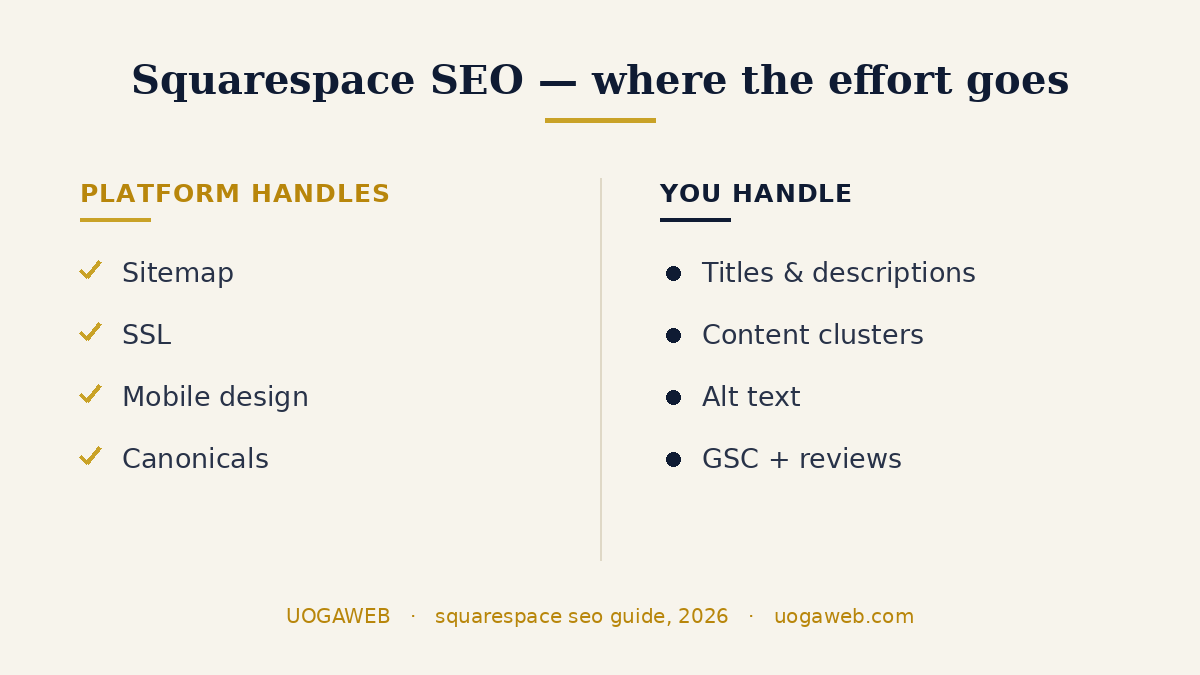
None of that needs a plugin, an app, or a developer. It's just there.
The settings that actually move the needle
Squarespace automates the boring-but-mandatory stuff. The parts that decide whether you outrank the salon three streets over are still manual, and most people skip them.
SEO titles and descriptions, per page
Every page, post, product and event has its own SEO Title and SEO Description fields, under Page Settings → SEO. Leave them blank and Squarespace falls back to your page title, rarely what you'd choose to put in front of someone scanning results. Write a specific one for every page that matters — homepage, services, each location, every blog post.
Alt text and image filenames
If you don't add alt text, Squarespace uses the image's file name instead — why “IMG_4821.jpg” is a wasted opportunity and “vilnius-hair-salon-balayage-before-after.jpg” isn't. Write real alt text anyway, short and plainly descriptive, because it also feeds accessibility — and don't rely on the fallback: image blocks and galleries want it entered directly.
Connect Google Search Console
This lives under Analytics → Search keywords → Connect. It's a five-minute job, and the only way to see what people actually search to find you, submit your sitemap, and request a fresh crawl after a big change. Skipping it doesn't hurt your rankings directly — it just means you're flying blind. Once it's connected, here's how to check what Google actually sees on your website — six free checks, about twenty minutes.
How do you actually do SEO on a Squarespace site?
In this order. The sequence matters more than people expect — most of the value sits in the first handful, and most site owners get to them last, if at all.
Before you publish
Site title under 60 characters, with a real keyword in it. Squarespace indexes this text even when you display a logo instead.
Site description, 50–300 characters. This one stands in for your homepage, which has no per-page SEO fields of its own.
A unique SEO description on every page that matters — 50–300 characters, written for a human scanning a results page. Blog posts, products and events each have the field too.
Check every URL slug. Save a blog post before you've titled it and Squarespace generates a random string of characters instead of words. I've taken over sites carrying a dozen of those.
Choose your blog post URL format now, not after you've published forty posts. Include the post title — changing it later means redirects.
Alt text on every image, and descriptive file names before you upload. Skip the alt text and Squarespace falls back to the file name, which is why IMG_4821.jpg is a wasted slot.
A favicon and a social sharing image — one site-wide, one per post. Both show up exactly where people decide whether to click.
A custom 404 page with links back into the site.
SSL set to Secure. Squarespace's own wording here is blunt: sites without it may be penalised.
On publish day
Verify in Google Search Console, then request indexing. Days instead of weeks.
Verify in Bing Webmaster Tools too. Twenty minutes, and it's the index ChatGPT and Copilot lean on — being missing there is close to invisible in those answers.
Google Business Profile, if you have an address or a service area.
Every month after that
Publish something genuinely useful, on a schedule you can actually keep.
Link each new page to the related older ones, and back again.
Redirect anything you move or delete.
If you're on version 7.1 there's an SEO report in the SEO panel that scans for missing alt text and missing page descriptions. Run it before launch and once a quarter after. It won't tell you what to write, but it will find every field you skipped. Or run a free check on your site and get the same list without logging into anything.
What Squarespace genuinely can't do
This is the part most Squarespace SEO content either ignores or overstates. Here's what's real, and what to do about it.
You can't edit robots.txt directly. There's no file access, granular or otherwise — just two sitewide toggles under Settings → Crawlers: block all search engines, or block a named list of AI crawlers. Both are blunt, all or nothing. Excluding one specific page instead uses a different, more useful tool: a per-page “Hide page from search results” toggle, available on every plan.
No custom schema or per-page code injection without upgrading. The automatic structured data above is fixed — you can't add FAQPage markup or custom Article schema to it. Doing that, or adding any per-page script, needs Code Injection, which requires the Core plan or higher, not included on Basic. I keep a site-wide schema block live through Code Injection on the sites I maintain, which covers most of the gap.
Neither is a dealbreaker for a hair salon, a physiotherapy studio or a personal trainer's site — they start to matter on a large content site or an enterprise build, a different conversation.
Content is the real ranking lever, not the builder

Once the technical basics are sorted — and on Squarespace, they mostly sort themselves — what's left is content, structure and links, the same three things that rank a WordPress site or a hand-coded one. It's the approach behind this post: pick a topic, break it into the questions people actually type into Google, answer each one directly near the top of its section, and link the related pieces together so the topic reads as a connected set, not one page shouting into the void. A handful of tightly linked, useful pages will outrank thirty thin ones, on any platform. Squarespace's blog editor won't build that structure for you, so you do it by hand.
One of my builds, a sports physiotherapy studio, is structured exactly this way — the site answers the questions a new patient actually searches before booking, section by section. See the build, or browse the portfolio for more examples across different service businesses.
Squarespace blog SEO: the part most guides skip
Blogging on Squarespace works well. There's one trap in it that costs people more than they realise.
Every tag and every category you add to a post automatically creates its own filtered page, with its own real URL — yoursite.com/blog/category/balayage, yoursite.com/blog/tag/wedding-hair. Those URLs go into your sitemap and can show up in search results. Add tags freely for a year and you've quietly published forty near-empty pages, each a thinner version of the post it points at.
Two things follow. Keep the list short and deliberate — a handful of categories you'd actually want someone to land on, not a keyword dump. And if you'd rather they weren't indexed at all, the blog page's settings, SEO tab, hide from search engines takes them out of the sitemap. Worth knowing: tags and categories are case-sensitive, so "Balayage" and "balayage" become two separate URLs.
Smaller things that add up on a blog:
Give every post its own SEO description. The field is right there per post. Blank means Google writes your snippet for you.
Use real headings. Format subheads as Heading 2 and Heading 3, in descending order — Squarespace writes the HTML tags for you. And multiple H1s on one page aren't a penalty, whatever you've read; Squarespace says so outright.
Link posts to each other on purpose. A related-posts block helps. One deliberate in-text link to the single most relevant post you've already written helps more.
Older discontinued templates are the one place this gets worse: their tag and category pages use dynamic URLs (?category=balayage) rather than static ones, and Squarespace's own documentation says dynamic URLs are less likely to rank well.
Local SEO on Squarespace
For a service business, local search usually matters more than generic keyword rank, and almost none of it is platform-specific. What moves a local pack listing is the same regardless of what your site runs on:
A complete, regularly updated Google Business Profile
A name, address and phone number (NAP) that matches exactly between your site and every listing
Genuine reviews, asked for consistently rather than left to chance
Location-specific content if you serve more than one area, not one generic “service area” paragraph
Squarespace's job here is just to not get in the way — fast pages, a real address in the footer, a contact page that isn't a dead end. It doesn't.
Serving customers in more than one language is a separate setup worth doing properly rather than duct-taping on. I've written the full guide to multilingual Squarespace sites here.
Getting cited by AI search in 2026, not just ranked
Google's AI Overviews, ChatGPT, Perplexity and Copilot are now a meaningful slice of how people find a small business, and getting cited runs on mostly the same fundamentals as ranking, plus a couple of specifics. Squarespace's own guidance on this — updated as recently as this week — lines up with what I've seen work: short, direct answers near the top of a section, not buried in paragraph four; real headings that mirror how someone would actually ask the question; bullet points and FAQ blocks, which these engines tend to lift close to verbatim; and clear authorship — a real name, real credentials, a real about page.
One setting worth checking: under Settings → Crawlers, there's a toggle to block known AI crawlers — GPTBot, ClaudeBot, Google-Extended and about twenty others. It's off by default, and I'd leave it off. An AI engine can't cite a page it isn't allowed to read. And that toggle trades a little training-data control for real visibility — not a good trade for a business trying to get found. I've gone deeper on this in Squarespace AI best practices.
How long Squarespace SEO takes to show results
Nobody selling SEO services likes this answer, but it's the honest one: weeks for indexing, months for movement, longer for anything competitive. On the sites I run, a new page is usually indexed within a few days of publishing — faster if you request it in Search Console — but meaningful ranking movement on a real keyword takes two to three months at the earliest. That timeline doesn't change because you're on Squarespace instead of anything else. It's a function of how search engines build trust in a page over time, not the CMS underneath it. Be suspicious of anyone promising faster.
Squarespace vs WordPress for SEO
The honest comparison isn't as close as people expect. WordPress can technically do more — granular robots.txt, unlimited plugins, per-post everything — but “can do more” and “will do more for a small service business” aren't the same claim. Most of that extra range is capability a hair salon or a personal trainer will never touch, and it comes with a maintenance job most owners didn't sign up for: plugin updates, security patches, a hosting bill, a slow page the day two plugins conflict. Squarespace trades some of that ceiling for a floor that just works — the right trade nearly every time for the businesses I build for. Here's the fuller comparison, including where WordPress genuinely wins.
Do Squarespace templates affect SEO?
Barely — and on a current site, not in the way people mean when they ask. Every version 7.1 site belongs to the same template family, with the same features and the same style options underneath, so choosing a different template doesn't buy you better SEO, faster pages or extra fields. It changes your starting design. That's the whole difference.
Your site version is a separate question, and it does matter, in three specific places. The SEO report that scans for missing alt text and page descriptions is 7.1 only. So is the AI Visibility tool. And discontinued 7.0 templates fall back to weaker dynamic URLs for blog tag and category pages.
So don't switch templates for SEO reasons — there's nothing there to gain. If you're on 7.0 and weighing up a rebuild, those missing tools are a fair argument for it, though the honest bigger one is simply that 7.1 is where Squarespace now puts its development.
What not to buy for Squarespace SEO
A few things worth saving your money on — I get asked about all three most weeks:
An “llms.txt” file. No major AI engine has confirmed it actually uses one as a ranking or citation signal, and it isn't needed for the AI features that matter today. Paying someone to write you one is paying for a rumour.
“AI schema” services. There's no separate schema standard for AI engines — it's the same structured data that's existed for years, and Squarespace already generates a baseline version of it automatically for your posts, products and business info.
Guaranteed-rankings packages. Nobody controls Google's algorithm or any AI engine's citation logic, on Squarespace or anywhere else. Anyone guaranteeing a position is either lying or hedging behind fine print you won't like.
If you run a hair or beauty salon
Everything above applies to any small service business, but salons and beauty studios are where I spend most of my time, and the playbook gets more specific once you're in that niche — booking-page structure, Treatwell and Fresha trade-offs, review flywheels. I've written the niche version of this on the salon website hub, including what a proper salon site costs to build in the UK.
FAQ: Squarespace SEO
Is Squarespace bad for SEO?
No. The fundamentals — crawlability, speed, mobile-friendliness, secure connections — are handled automatically on every plan. Rankings come down to content, structure and links, true of every platform, not a Squarespace-specific weakness.
Squarespace vs WordPress for SEO?
WordPress has a higher technical ceiling, but most small service businesses never need it, and it comes with a maintenance job Squarespace removes entirely — updates, security, hosting. Squarespace's floor is usually the better trade.
Does Squarespace support schema markup?
Automatically, for six content types: blog posts, events, local business info, organisation details, products and the site itself. Custom schema like FAQPage markup needs Code Injection, which requires the Core plan or higher.
How long does Squarespace SEO take to work?
Indexing happens within days. Meaningful ranking movement takes two to three months at the earliest, longer for competitive terms — a timeline set by search engines, not the platform.
Do I need to upgrade my plan for good SEO?
No. Core fundamentals — sitemap, SSL, mobile-responsive design, per-page titles and descriptions, alt text — work on every plan, including Basic. You'd only need Core or higher for Code Injection.
Can AI chatbots like ChatGPT recommend my Squarespace site?
Yes. Keep the block-known-AI-crawlers toggle off, write short direct answers near the top of each section, and use real headings and FAQ blocks these tools can lift cleanly.
Is there a Squarespace SEO checklist?
Yes — Squarespace publishes its own, and the ordered version above is mine, sequenced by what moves first. The short form: site title and description, a unique SEO description per page, real URL slugs, alt text, SSL on Secure, then Search Console and Bing Webmaster Tools on publish day.
Do Squarespace templates affect SEO?
Not on version 7.1 — every 7.1 site shares the same underlying features, so the template only changes your starting design. Version 7.0 sites miss the SEO report and the AI Visibility tool, and discontinued templates use weaker dynamic URLs for blog tag and category pages.
How do I do SEO on a Squarespace blog post?
Write a unique SEO description for that post, use a real title-based URL slug, format subheads as Heading 2 and 3, keep tags and categories few and deliberate — each one creates its own indexable page — and link the post to the most relevant post you have already published.
If you're trying to decide whether to fix your Squarespace SEO yourself or bring someone in, book a free 15-minute consultation — I'll look at your actual site, not read you a generic checklist.
Gediminas Vengrauskas is the founder of UOGAweb, a Squarespace Circle Gold studio building websites for hair & beauty salons and small service businesses across the UK and Lithuania.